Thursday, January 1, 2015

3D Printing: Heat Shields for Larger Parts

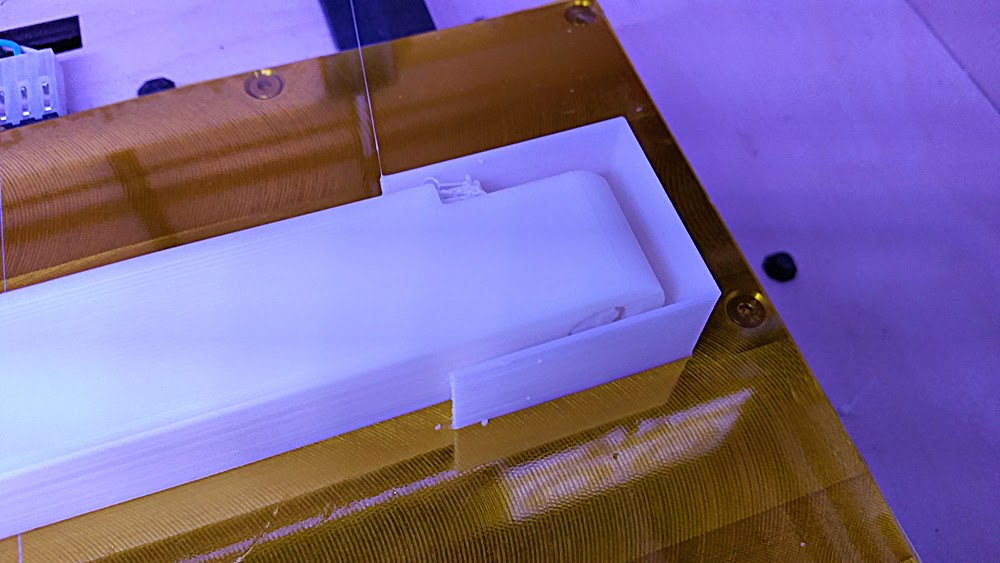
Not 100% sure where I read it first, but the idea of using a heat shield (technically a "draft" shield) really does work!  Usually on my Replicator, a part that spans across the entire build platform will curl up on both ends.  

However, using a 0.8mm thick heat shield (single 0.4mm shell all around), this client part came out perfectly straight.  Also helped with the start and stop filament gapping that occurs with accelerated printing.


Monday, September 8, 2014

ZBRUSH: Delete Tool

It took a bit of Google searching for something as simple as this, but it turns out the only way to delete a tool from your 3D Meshes palette is to delete it in the SubTool menu.  It's a bit counter intuitive considering all your subtools are nested under that tool / mesh, but once you delete all the subtools on that mesh, your tool has been successfully deleted from 3D Meshes palette.

Thursday, August 21, 2014

MAYA: Viewport 2.0

I've been living under a rock hidden in the deepest cave known to man, because I just discovered Maya's viewport 2.0.  I've been so stuck in my ways in terms of workflow that I failed to notice this little gem hidden under the "Renderer" tab of my viewport.

What used to chug along at 3-5 frames a second is now blazingly fast thanks to what I can only imagine is GPU utilization.  Wonder what other wonderful tool exists in Maya's toolbag that I've been neglecting... the possibilities!

https://www.youtube.com/watch?v=zJNF7CZ-VjI

Wednesday, August 20, 2014

ZBRUSH: ZProject Brush

The ZBrush ZProject brush just became one of the most useful tools for my 3D printing pipeline.  I have an incredibly high detailed model of an engine that I have to make printable, with about 1.5 days of working time.

Naturally, I thought of ZBrush as my go-to toolbox for high poly mesh manipulation.  Using the "ProjectAll" feature under the SubTool panel yielded rough results.  There's just so much detail in the model that it requires a manual touch.  In comes the ZProject brush.

Essentially, it's the manual version of ProjectAll, allowing you to manually push and pull the geometry to fit the "plug".  Works almost like vacuum forming, and brought back fond memories of making aluminum foil clones of my Hotwheels cars, destined to by crushed by my RC car.

Tuesday, May 20, 2014

ZBRUSH: 3D Pixel Art

Accidentally stumbled upon a technique for creating 3D pixel art!  Using a very low resolution 'Remesh' setting under the Subtools menu, it'll create something similar to this:


Monday, April 28, 2014

DAILY DOODLES

This blog has become too much of a tech notes library, so here's some of my recent-ish digital 30min-to-an-hour digital doodles.  Hopefully I can get into the habit of doing these "daily" again soon.

("Grumpy Cat" was done with reference.)


Wednesday, April 23, 2014

ZBRUSH: 32-Bit Displacements

http://funwithcg.blogspot.com/2011/06/rendering-32-bit-displacements-in.html